Table of Contents
HYBRID Parameters hypothesis works only with MeshGems-Hybrid algorithm. This algorithm is a commercial software.
To get a license, visit https://www.spatial.com/products/3d-precise-mesh
General parameters
MG-Hybrid allows to generate meshes with:
- tetrahedral or hexahedral elements for the main core of the shape,
- prismatic layers (prisms or hexahedra) depending on the surface mesh (triangles or quadrangles)
- pyramids doing the junction if needed between tetrahedra (or prisms) and hexahedra.
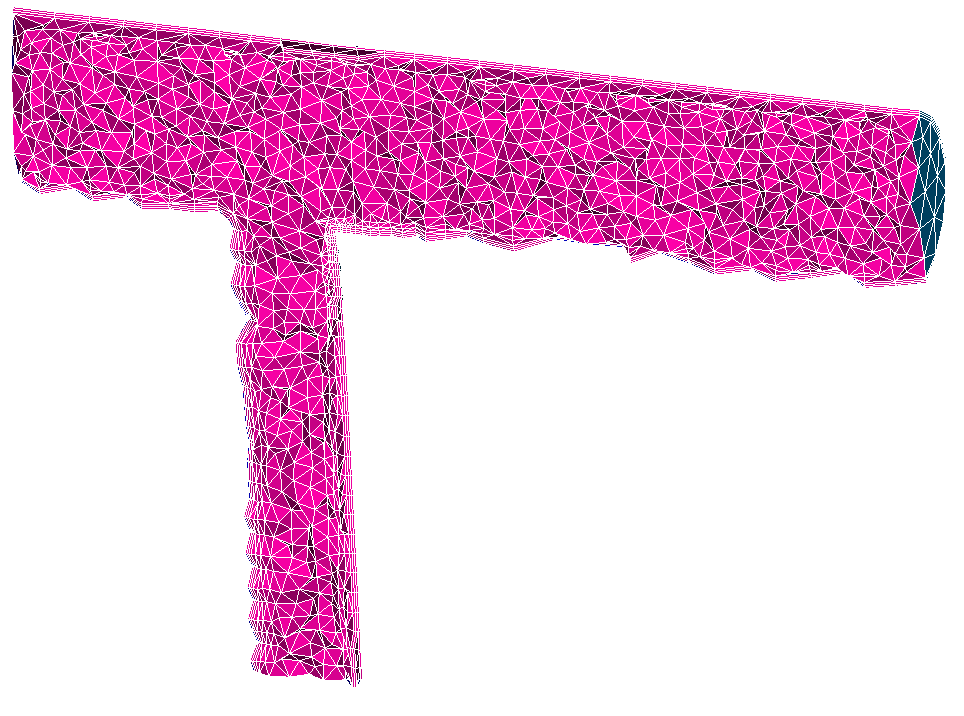
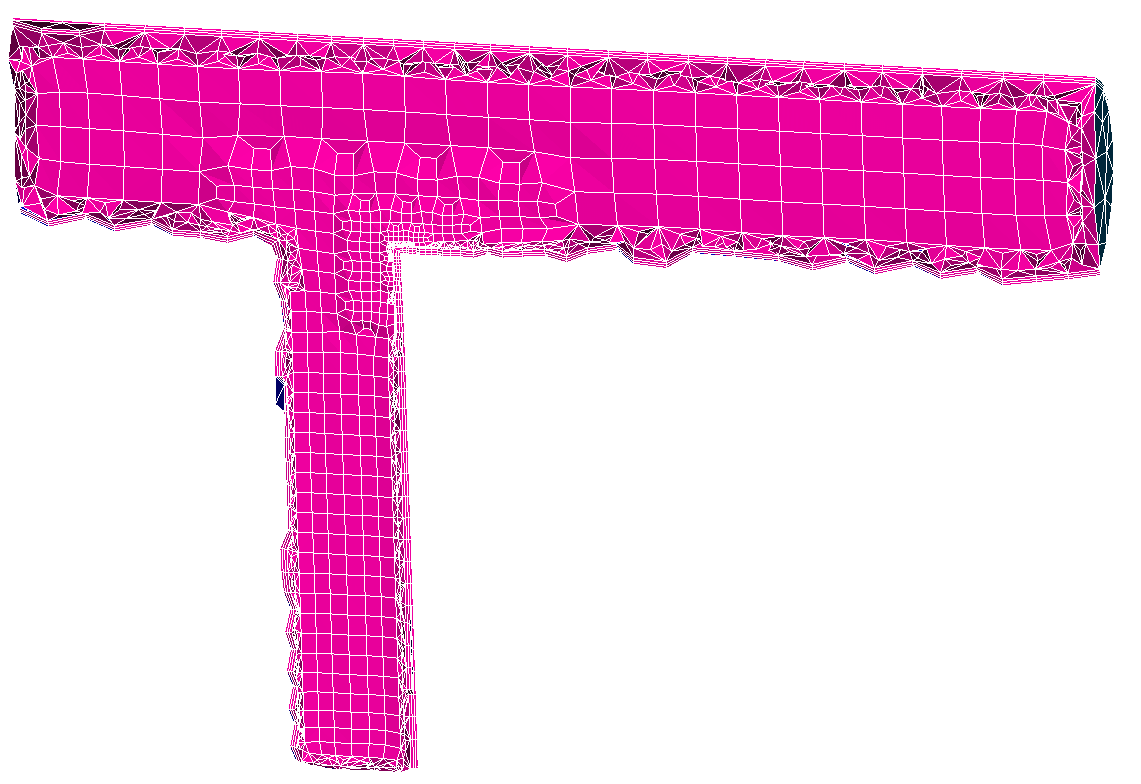
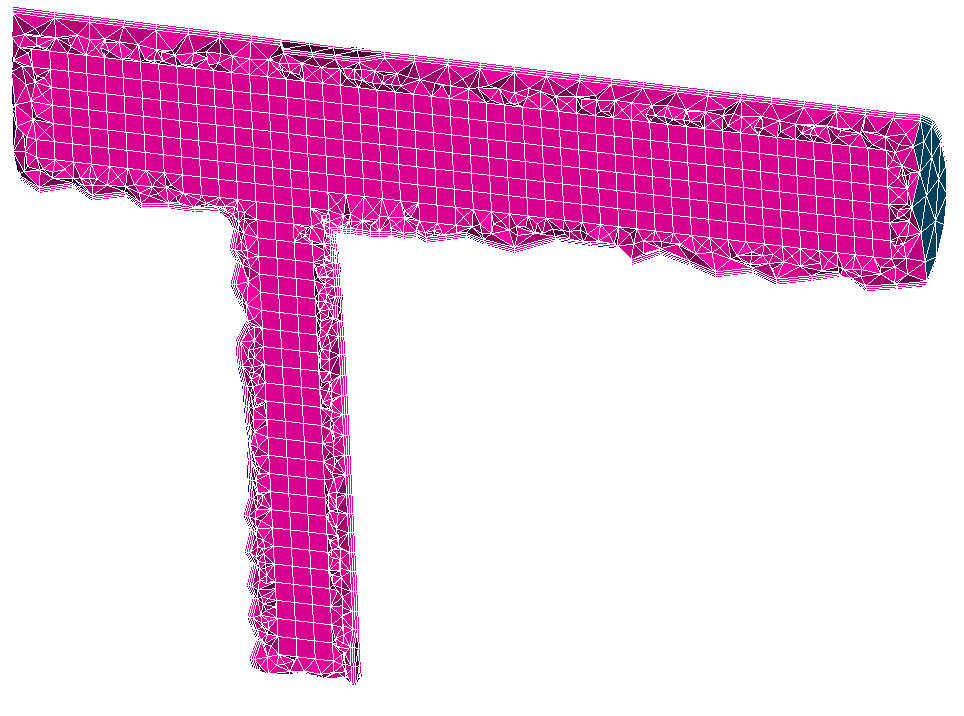

- Number of boundary layers - Sets the number of boundary layers to add.
- Size mode - Define where to sets the boundary layers:
- Global - Define the layers on all the faces
- Local - Define the layers on selected faces. To be selected on the tab Faces with layers
- Height of first layer - Define the height of the first layer
- Height relative to local surface - If set to yes, the given size is relative to the surface size
- Growth of boundary layers - Define if the boundary layers will be added inside the domain (Downward growth) or outside the domain (Upward growth).
- Maximal element angle (degrees) - Sets the maximum internal angles of elements (in degree). This setting applies to the boundary layer elements only.
- Geometric progression - Sets the geometric progression for all the boundary layer growths.
- Imprinting - If set to yes, allows to define where the boundary layers will be imprinted (the inlets and oulets in a CFD study). These faces are to be selected in the Faces with imprinting tab.
- Snapping - If set to yes, allows to define where the boundary layers are already imprinted on the 2D mesh (the inlets and oulets in a CFD study). These faces are to be selected in the Faces with snapping tab.
Advanced parameters

Advanced meshing options
- A table allows to input in the command line any text for hybrid argument from "mg-hybrid.exe help", and future advanced options...
Add option - adds a line to the table where you can type an option and its value as text. A check box in the first column activates/deactivates the option of the current row. A deactivated option will be erased upon pressing Ok. - Add multi normals - Add extra normals at opening ridges and corners.
- Collision mode - Sets the behavior in case of collision between layers.
- decrease - keeps the number of desired layer but decreases the height of the layers to avoid any collision
- stop - stops locally the generation of layers to avoid collisions; the number of generated layers may differ from the specified desired number
- Gradation - Sets the desired maximum ratio between 2 adjacent edges. It applies only to the edges which belong to the tetrahedra.
- Maximum number of threads - Sets the maximum number of threads to be used in parallel.
- Multi normal angle threshold - Set the maximum angle (in degrees) between the multiple normals at opening ridges.
- Smooth normals - Smooth normals at closed ridges and corners.
Logs and debug
- Working directory - allows defining the folder for input and output files of hybrid software, which are the files starting with "HYBRID_" prefix.
- Verbose level - to choose verbosity level in the range from 0 to 10.
- 0, no standard output,
- 2, prints the data, quality statistics of the skin and final meshes and indicates when the final mesh is being saved. In addition the software gives indication regarding the CPU time.
- 10, same as 2 plus the main steps in the computation, quality statistics histogram of the skin mesh, quality statistics histogram together with the characteristics of the final mesh.
- Print log in a file - if this option is checked on the log is printed in a file placed in the working directory, otherwise it is printed on the standard output.
- Remove log on success - if this option is checked on the log file is kept only if an error occurs during the computation. This option is only available if Print log in a file is enabled (there must be a log file to delete it) and Keep all working files is disabled (in this case the log file is always kept).
- Keep all working files - allows checking input and output files of hybrid software, while usually these files are removed after the launch of the mesher. The log file (if any) is also kept if this option is checked.
- Use library - allows to call MG-Hybrid by library instead of executable. You can also set the environment variable MG_HYBRID_USE_LIB to change this default behaviour.
Faces with layers

In case of a mesh based on geometry, if Size mode is set to Local, this tab becomes activated. You can specify geometrical faces on which boundary layers should be constructed (i.e. corresponding to the walls in a CFD study). After clicking Selection button (arrow) you can select faces either in the Viewer or in the Object Browser. Add button adds IDs of the selected faces to the Face IDs list. Remove button removes selected IDs from the list.
Faces with layers
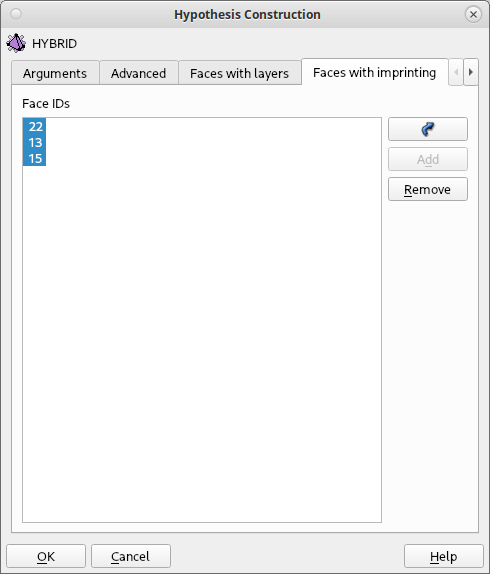
If Imprinting is set to yes, this tab becomes activated. You can select the faces where the layers will be imprinted (i.e. corresponding to the inlets and outlets in a CFD study).
Faces with layers
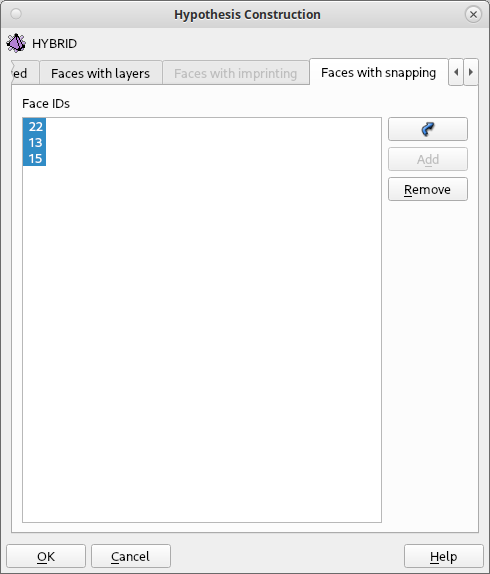
Instead of letting MG-Hybrid do the imprinting on faces, you can tell to use existing faces where cells corresponding to the imprinting are already present (created by the surface mesh generation with dedicated algorithms).
See Also a sample TUI Script of the creation of a MG-Hybrid hypothesis.
All MG-hybrid parameters
- Hybrid parameters - See documentation in $MESHGEMS_ROOT_DIR/Docs/mg-hybrid_user_manual.pdf or MG-Hybrid help command:
$> mg-hybrid.exe --help

    ============================================
    MG-Hybrid -- MeshGems 2.15-1 (January, 2023)
    ============================================


        Running MG-Hybrid (Copyright 2014-2023 by Dassault Systemes SE)
           date of run: 06-Jun-2024 AT 13:13:22
           running on : Linux 5.11.12-300.fc34.x86_64 x86_64
           using modules:
                MeshGems-Core 2.15-1

        MeshGems is a commercial trademark of Dassault Systemes SE


MG-HYBRID USAGE
    mg-hybrid.exe [-h] [-v <verbose>] [-i <filein>] [-o <fileout>] \
        [--global_physical_size <size>] \
        [--max_number_of_threads <maxthreads>] \
        [--boundary_layer_size_mode <mode>] \
        [--boundary_layer_height_relative_to_local_surface_size <yes|no>] \
        [--number_of_boundary_layers <number>] \
        [--boundary_layer_global_initial_height <height>] \
        [--boundary_layer_surface_tags <list>] \
        [--boundary_layer_initial_height_on_surface_tags <list>] \
        [--boundary_layer_geometric_progression <real>] \
        [--boundary_layer_max_element_angle <size>] \
        [--boundary_layer_imprinting <boolean>] \
        [--boundary_layer_imprinting_tags <list>] \
        [--boundary_layer_snapping <boolean>] \
        [--boundary_layer_snapping_tags <list>] [--normal_direction <dir>] \
        [--gradation <real>] [--element_generation <type>] \
        [--collision_mode <mode>] [--add_multinormals <yes|no>] \
        [--multinormal_angle_threshold <angle>] [--smooth_normals <yes|no>] \
        [--optimisation <type>]

  -h --help
          prints this help.

  -v --verbose <verbose>
          Sets the verbosity level parameter.
          The <verbose> parameter must be in the range 0 to 10:
            0 : no detail
            10 : very detailed
          Default: 3

  -i --in <filein>
          Sets the input file.
          (MANDATORY)

  -o --out <fileout>
          Sets the output file.
          If unset, _hybrid is appended to the input file basename.
          Using an existing file is forbidden.
          Using the same file as --in is forbidden.

     --global_physical_size <size>
          Sets the global physical size.
          Default: no default.

     --max_number_of_threads <maxthreads>
          Sets the maximum number of threads to be used in parallel.
          Default: 4

     --boundary_layer_size_mode <mode>
          Sets the behavior for the boundary layer sizes.
          If <mode> is:
            global: the boundary_layer_global_initial_height is used to compute
             the layer heights
            local: the boundary_layer_surface_tags and
             boundary_layer_initial_height_on_surface_tags are used to compute
             the layer heights
          Default: global

     --boundary_layer_height_relative_to_local_surface_size <yes|no>
          If set to yes, the given sizes are relative to the surface size
          Default: no

     --number_of_boundary_layers <number>
          Sets the number of boundary layers.
          Default: 0

     --boundary_layer_global_initial_height <height>
          Sets the height of the first layer.

     --boundary_layer_surface_tags <list>
          Comma separated list of surface references to be used to grow
          boundary layers.

     --boundary_layer_initial_height_on_surface_tags <list>
          Comma separated list of initial heights to be used to grow boundary
          layers.

     --boundary_layer_geometric_progression <real>
          Sets the geometric progression for all the boundary layer growths
          (position of layer number i is h * g^(i-1)).
          Default: 1.0

     --boundary_layer_max_element_angle <size>
          Sets the maximum internal angles of elements (in degree). This
          setting applies to the boundary layer elements only.
          Default: 165.

     --boundary_layer_imprinting <boolean>
          Activates the imprinting of the boundary layers. The parts of the
          surface where the layers have to be imprinted are defined through the
          option --boundary_layer_imprinting_tags
          Default: no imprinting

     --boundary_layer_imprinting_tags <list>
          Comma separated list of surface references that have to be imprinted
          by boundary layers.

     --boundary_layer_snapping <boolean>
          Activates the snapping of the generated boundary layers on the
          surface. The parts of the surface where the layers have to be snapped
          into are defined through the option --boundary_layer_snapping_tags
          Default: no snapping

     --boundary_layer_snapping_tags <list>
          Comma separated list of surface references that are imprinted by
          boundary layers.

     --normal_direction <dir>
          Specifies whether mg-hybrid should use the surface normals or the
          inverse of the surface normals.
          if <dir> is:
             1 : means the layers grow in the same direction as the normals to
             the surface
            -1 : means the layers grow in the opposite direction to the normals
             of the surface
          Default: 1

     --gradation <real>
          Sets the desired maximum ratio between 2 adjacent edges. It applies
          only to the edges which belong to the tetrahedra.
          Default: 2.0

     --element_generation <type>
          Sets the element type for the mesh generation.
          If <type> is:
            tetra_dominant : prismatic or hexahedral elements in the boundary
             layers, tetrahedra in the remaining volume
            hexa_dominant : prismatic or hexahedral elements in the boundary
             layers, mixture of hexahedra and tetrahedra in the remaining
             volume
            cartesian_core : cartesian hexa core with tetrahedra and pyramids
             in the remaining volume
            extrusion_only : only prismatic or hexahedral elements near the
             boundary are generated. The remaining volume is not filled.
          Default: tetra_dominant

     --collision_mode <mode>
          Sets the behavior in case of collision between layers.
          If <mode> is:
            decrease : keeps the number of desired layer but decreases the
             height of the layers to avoid any collision
            stop : stops locally the generation of layers to avoid collisions;
             the number of generated layers may differ from the specified
             desired number
          Default: stop

     --add_multinormals <yes|no>
          Add extra normals at opening ridges and corners.
          Default: no

     --multinormal_angle_threshold <angle>
          Set the maximum angle between the multiple normals at opening ridges.
          Default: 30

     --smooth_normals <yes|no>
          Smooth normals at closed ridges and corners.
          Default: no

     --optimisation <type>
          sets the optimisation type.
          If <type> is:
              no : no optimisation is applied
             yes : optimisation is performed upon mesh generation
            only : only optimisation is performed to an existing volume mesh.
          Default: yes.


====================================================================================
                    MG-Hybrid -- MeshGems 2.15-1 (January, 2023)
      END OF SESSION - MG-Hybrid (Copyright 2014-2023 by Dassault Systemes SE)
                     compiled Jan 18 2023 13:33:47 on Linux_64
             MeshGems is a commercial trademark of Dassault Systemes SE
====================================================================================