With GUI
To make the use of « Bloc Fissure » easier, a Graphical User Interface (GUI) was developed. Inputs are similar to those of script mode. GUI is accessible in the SMESH extension Add a crack in a mesh
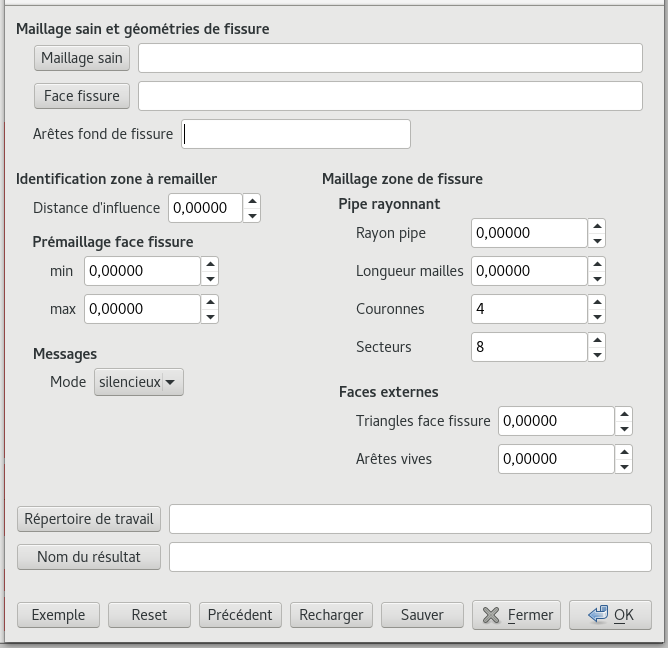
Window of the graphical interface
GUI parameters |
||
|---|---|---|
Maillage sain |
[string] ex: mesh/maillage.med |
Relative address of the input structure 3D mesh in MED format (base is repertoire de travail) |
Face fissure |
[string] ex: mesh/fissure.xao |
Relative address of the input crack geometry in BREP or XAO format (base is repertoire de travail) |
Arêtes fond fissure |
[list of strings] ex: [“F_1”, “F_2”] |
Definition of the crack front: If XAO: list of the names of the edge group(s) |
[list of integers] ex: [1,2] |
If BREP (or XAO): list of edges number in GEOM |
|
Distance d’influence |
[float] ex: 20.0000 |
Length of influence - distance that defines the size of the extracted Box around the crack |
min |
[float] ex: 1.00000 |
Float defining the minimum size of elements to mesh the crack |
max |
[float] ex: 10.0000 |
Float defining the maximum size of elements to mesh the crack |
Rayon pipe |
[float] ex: 5.00000 |
Radius of the tore around the front |
Longueur mailles |
[float] ex: 5.00000 |
Length of the segments of the tore along crack front |
Couronnes |
[integer] ex: 5 |
Number of radial segment of the tore |
Secteurs |
[integer] ex: 16 |
Number of sectors of the tore |
Triangles face fissure |
[float] ex: 5.0000 |
Mesh size of elements for the Box remeshing |
Répertoire de travail |
[string] ex: /home/A123456 |
Absolute address of the directory where files are saved |
Nom du résultat |
[string] ex: maillage_fissure |
Name of the resulting mesh |
Mode |
[choice] ex: verbose |
Verbose mode for Salome messages |
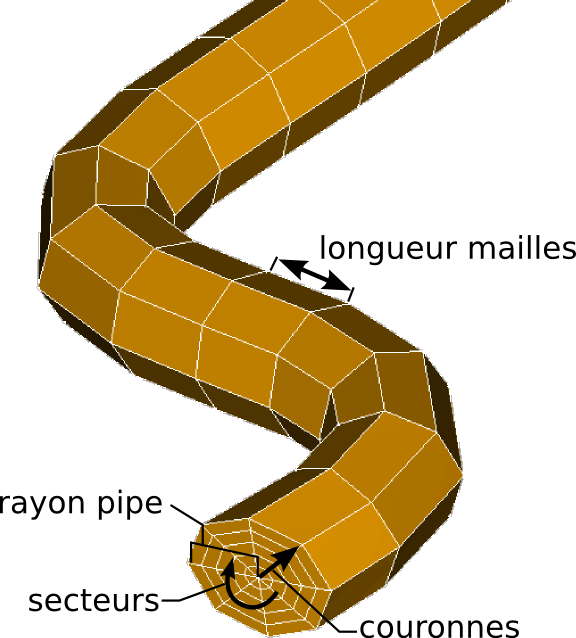
Tore parameters
Example: fills the panels with a test-case
Reset: clears all the parameters
Précédent: loads the last set of parameters used
Recharger: loads a .dic file containing parameters
Sauver: save a .dic file with the active parameters
Fermer: exit GUI
OK: Launch calculation