Plane
Plane feature creates a new constructive plane.
Plane is a construction object that can be created in a part or in a partset. To create a plane:
select in the Main Menu Construction - > Plane item or
click
 Point button in the toolbar
There are 4 algorithms for creation of a Plane:

By three points creates a plane by three points.

By line and point creates a plane by a line and a point.

By other plane creates a plane or planes(if the number of copies is more than one) parallel to another plane.

By two parallel planes creates a plane between two parallel planes.
By three points
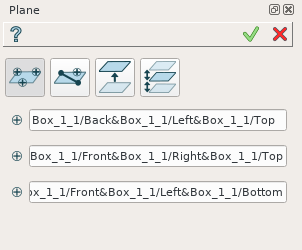
By three points
A plane is created by selecting three points in a viewer.
TUI Commands:
- model.addPlane(Part_doc, model.selection("VERTEX", "Box_1_1/Back&Box_1_1/Left&Box_1_1/Top"), model.selection("VERTEX", "Box_1_1/Front&Box_1_1/Right&Box_1_1/Top"), model.selection("VERTEX", "Box_1_1/Front&Box_1_1/Left&Box_1_1/Bottom"))
- Parameters:
part – The current part object.
object – Vertex 1.
object – Vertex 2.
object – Vertex 3.
- Returns:
Result object.
Result
The Result of the operation will be a plane:
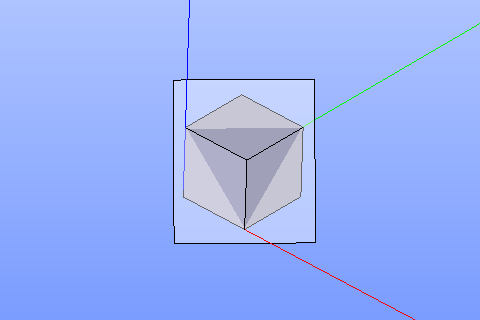
A plane by three points
See Also a sample TUI Script of Create Plane by points operation.
By line and point
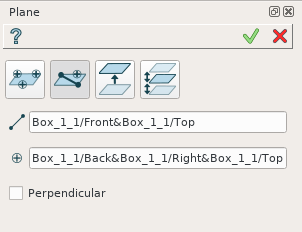
Line and point
A plane is created by selecting a linear edge and point. It is possible to create a new plane perpendicular to the selected edge.
TUI Commands:
- model.addPlane(Part_doc, model.selection("EDGE", "Box_1_1/Left&Box_1_1/Top"), model.selection("VERTEX", "Box_1_1/Front&Box_1_1/Right&Box_1_1/Bottom"), False)
- Parameters:
part – The current part object.
object – A line.
object – A point.
boolean – Is perpendicular to line.
- Returns:
Result object.
Result
The Result of the operation will be a plane:
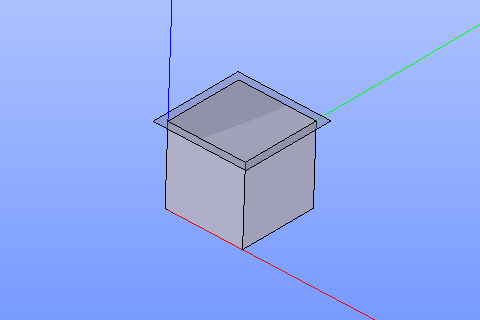
Plane created
See Also a sample TUI Script of Create Plane by line and point operation.
By other plane
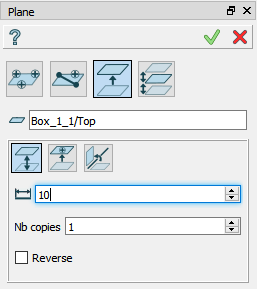
By other plane
A plane is created by selecting an already existing plane (planar face). There are following possibilities to define a new plane:

By distance from the selected plane.

By coincidence with a point.

By rotation around an edge by a specified angle.
TUI Commands:
- model.addPlane(Part_doc, model.selection("FACE", "Box_1_1/Front"), 10, False, 1)
- Parameters:
part – The current part object.
object – A plane.
real – An offset.
boolean – Is reverse.
integer – Number of copies
- Returns:
Result object.
Result
The Result of the operation will be a plane (or planes at equal distance from each other, if the number of copies is more than one) parallel to already existing one:
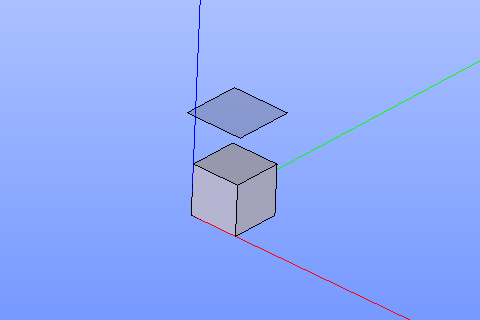
Plane parallel to a planar face
See Also a sample TUI Script of Create Plane by other plane operation.
By two parallel planes
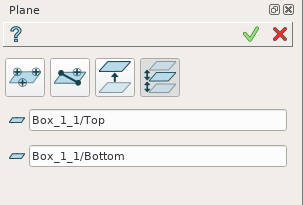
By two parallel planes
A plane is created by selecting two parallel planes. A new plane will be defined between them.
TUI Commands:
- model.addPlane(Part_doc, model.selection("FACE", "Box_1_1/Left"), model.selection("FACE", "Box_1_1/Right"))
- Parameters:
part – The current part object.
object – A plane 1.
object – A plane 2.
- Returns:
Result object.
Result
The Result of the operation will be a plane created between two selected planes:
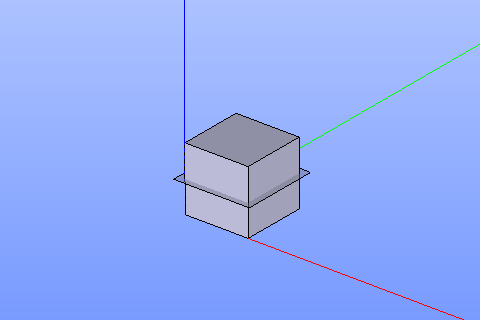
Plane created between others
See Also a sample TUI Script of Create Plane by two parallel planes operation.