Convert to/from Quadratic Mesh
This functionality allows transforming linear meshes (or sub-meshes) to quadratic and vice versa.
Note
that conversion of a sub-mesh most probably will produce a non-conformal mesh. Elements on the boundary between quadratic and linear sub-meshes become (or remain) quadratic.
See Adding Quadratic Elements for more information about quadratic meshes.
To produce a conversion:
Select a mesh or a sub-mesh in the Object Browser or in the Viewer.
From the Modification menu or from the contextual menu in the Object Browser choose Convert to/from Quadratic Mesh item, or click “Convert to/from quadratic” button
 in the toolbar.
The following dialog box will appear:

In this dialog box specify:
If it is necessary to convert a linear mesh to quadratic or a quadratic mesh to linear. Convert to bi-quadratic creates some types of quadratic elements with additional central nodes: TRIA7, QUAD9 and HEXA27 elements instead of TRIA6, QUAD8, and HEXA20 elements respectively.
If it is necessary to place medium nodes of the quadratic mesh on the geometry (meshed shape). This option is relevant for conversion to quadratic provided that the mesh is based on a geometry (not imported from file).

Linear mesh (coarse mesh on a torus)
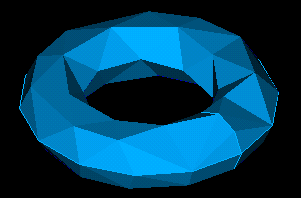
Quadratic mesh
Click the Apply or Apply and Close button.
See Also a sample TUI Script of a Convert mesh to/from quadratic operation.