This algorithm realizes an estimation of the state of a dynamic system by a
Kalman Filter. In discrete form, it is an iterative (or recursive) estimator of
the current state using the previous state and the current observations. The
time (or pseudo-time) between two steps is the time between successive
observations. Each iteration step is composed of two successive phases,
classically called “prediction” and “correction”. The prediction step uses
an incremental evolution operator to establish an estimate of the current state
from the state estimated at the previous step. The correction (or update)
step uses the current observations to improve the estimate by correcting the
predicted state.
It is theoretically reserved for observation and incremental evolution
operators cases which are linear, even if it sometimes works in “slightly”
non-linear cases. One can verify the linearity of the operators with the help
of a Checking algorithm “LinearityTest”.
Conceptually, we can represent the temporal pattern of action of the evolution
and observation operators in this algorithm in the following way, with x
the state, P the state error covariance, t the discrete iterative time :
Fig. 13.2 Timeline of steps in Kalman filter data assimilation
In this scheme, the analysis (x,P) is obtained by means of the
“correction” by observing the “prediction” of the previous state. We notice
that there is no analysis performed at the initial time step (numbered 0 in the
time indexing) because there is no forecast at this time (the background is
stored as a pseudo analysis at the initial time step). If the observations are
provided in series by the user, the first one is therefore not used.
This filter can also be used to estimate (jointly or solely) parameters and not
the state, in which case neither the time nor the evolution have any meaning.
The iteration steps are then linked to the insertion of a new observation in
the recursive estimation. One should consult the section
Going further in data assimilation for dynamics for the implementation concepts.
13.10.2. Some noteworthy properties of the implemented methods
To complete the description, we summarize here a few notable properties of the
algorithm methods or of their implementations. These properties may have an
influence on how it is used or on its computational performance. For further
information, please refer to the more comprehensive references given at the end
of this algorithm description.
The optimization methods proposed by this algorithm perform a local search
for the minimum, theoretically enabling a locally optimal state (as opposed
to a “globally optimal” state) to be reached.
The methods proposed by this algorithm require the derivation of the
objective function or of one of the operators. It requires that at least
one or both of the observation or evolution operators are differentiable, and
this implies an additional calculation time in the case where the derivatives
are calculated numerically by multiple evaluations.
The methods proposed by this algorithm have no internal parallelism, but
use the numerical derivation of operator(s), which can be parallelized. The
potential interaction, between the parallelism of the numerical derivation,
and the parallelism that may be present in the observation or evolution
operators embedding user codes, must therefore be carefully tuned.
The methods proposed by this algorithm achieve their convergence on one or
more static criteria, fixed by some particular algorithmic properties. In
practice, there may be several convergence criteria active simultaneously.
The more frequent algorithmic property is the one of direct calculations,
which evaluate the converged solution without any controllable iteration.
There is no convergence threshold to be adjusted in this case.
The general required commands, available in the editing user graphical or
textual interface, are the following:
Background
Vector. The variable indicates the background or initial vector used,
previously noted as . Its value is defined as a
“Vector” or “VectorSerie” type object. Its availability in output is
conditioned by the boolean “Stored” associated with input.
BackgroundError
Matrix. This indicates the background error covariance matrix, previously
noted as . Its value is defined as a “Matrix” type
object, a “ScalarSparseMatrix” type object, or a “DiagonalSparseMatrix”
type object, as described in detail in the section
Requirements to describe covariance matrices. Its availability in output is
conditioned by the boolean “Stored” associated with input.
EvolutionError
Matrix. The variable indicates the evolution error covariance matrix,
usually noted as . It is defined as a “Matrix” type
object, a “ScalarSparseMatrix” type object, or a “DiagonalSparseMatrix”
type object, as described in detail in the section
Requirements to describe covariance matrices. Its availability in output is
conditioned by the boolean “Stored” associated with input.
EvolutionModel
Operator. The variable indicates the evolution model operator, usually
noted , which describes an elementary step of evolution. Its value
is defined as a “Function” type object or a “Matrix” type one. In the
case of “Function” type, different functional forms can be used, as
described in the section Requirements for functions describing an operator. If there
is some control included in the evolution model, the operator has
to be applied to a pair .
Observation
List of vectors. The variable indicates the observation vector used for
data assimilation or optimization, and usually noted .
Its value is defined as an object of type “Vector” if it is a single
observation (temporal or not) or “VectorSeries” if it is a succession of
observations. Its availability in output is conditioned by the boolean
“Stored” associated in input.
ObservationError
Matrix. The variable indicates the observation error covariance matrix,
usually noted as . It is defined as a “Matrix” type
object, a “ScalarSparseMatrix” type object, or a “DiagonalSparseMatrix”
type object, as described in detail in the section
Requirements to describe covariance matrices. Its availability in output is
conditioned by the boolean “Stored” associated with input.
ObservationOperator
Operator. The variable indicates the observation operator, usually noted as
, which transforms the input parameters to
results to be compared to observations
. Its value is defined as a “Function” type object or a
“Matrix” type one. In the case of “Function” type, different functional
forms can be used, as described in the section
Requirements for functions describing an operator. If there is some control
included in the observation, the operator has to be applied to a pair
.
Predefined name. This key allows to choose the type of estimation to be
performed. It can be either state-estimation, with a value of “State”, or
parameter-estimation, with a value of “Parameters”. The default choice is
“State”.
Example:
{"EstimationOf":"Parameters"}
StoreSupplementaryCalculations
List of names. This list indicates the names of the supplementary
variables, that can be available during or at the end of the algorithm, if
they are initially required by the user. Their availability involves,
potentially, costly calculations or memory consumptions. The default is then
a void list, none of these variables being calculated and stored by default
(excepted the unconditional variables). The possible names are in the
following list (the detailed description of each named variable is given in
the following part of this specific algorithmic documentation, in the
sub-section “Information and variables available at the end of the
algorithm”): [
“Analysis”,
“APosterioriCorrelations”,
“APosterioriCovariance”,
“APosterioriStandardDeviations”,
“APosterioriVariances”,
“BMA”,
“CostFunctionJ”,
“CostFunctionJAtCurrentOptimum”,
“CostFunctionJb”,
“CostFunctionJbAtCurrentOptimum”,
“CostFunctionJo”,
“CostFunctionJoAtCurrentOptimum”,
“CurrentOptimum”,
“CurrentState”,
“CurrentStepNumber”,
“EnsembleOfSimulations”,
“EnsembleOfStates”,
“ForecastCovariance”,
“ForecastState”,
“IndexOfOptimum”,
“InnovationAtCurrentAnalysis”,
“InnovationAtCurrentState”,
“SimulatedObservationAtCurrentAnalysis”,
“SimulatedObservationAtCurrentOptimum”,
“SimulatedObservationAtCurrentState”,
].
Example :
{"StoreSupplementaryCalculations":["CurrentState","Residu"]}
13.10.4. Information and variables available at the end of the algorithm
At the output, after executing the algorithm, there are information and
variables originating from the calculation. The description of
Variables and information available at the output show the way to obtain them by the method
named get, of the variable “ADD” of the post-processing in graphical
interface, or of the case in textual interface. The input variables, available
to the user at the output in order to facilitate the writing of post-processing
procedures, are described in an Inventory of potentially available information at the output.
Permanent outputs (non conditional)
The unconditional outputs of the algorithm are the following:
Analysis
List of vectors. Each element of this variable is an optimal state
in optimization, an interpolate or an analysis
in data assimilation.
Example:
xa=ADD.get("Analysis")[-1]
Set of on-demand outputs (conditional or not)
The whole set of algorithm outputs (conditional or not), sorted by
alphabetical order, is the following:
Analysis
List of vectors. Each element of this variable is an optimal state
in optimization, an interpolate or an analysis
in data assimilation.
Example:
xa=ADD.get("Analysis")[-1]
APosterioriCorrelations
List of matrices. Each element is an a posteriori error correlations
matrix of the optimal state, coming from the covariance
matrix. In order to get them, this a posteriori error covariances
supplementary calculation has to be requested at the same time by the keyword
“APosterioriCovariance”.
List of matrices. Each element is an a posteriori error covariance
matrix of the optimal state.
Example:
apc=ADD.get("APosterioriCovariance")[-1]
APosterioriStandardDeviations
List of matrices. Each element is an a posteriori error standard errors
diagonal matrix of the optimal state, coming from the
covariance matrix. In order to get them, this a posteriori error
covariances supplementary calculation has to be requested at the same time by
the keyword “APosterioriCovariance”.
List of matrices. Each element is an a posteriori error variance errors
diagonal matrix of the optimal state, coming from the
covariance matrix. In order to get them, this a posteriori error
covariances supplementary calculation has to be requested at the same time by
the keyword “APosterioriCovariance”.
Example:
apv=ADD.get("APosterioriVariances")[-1]
BMA
List of vectors. Each element is a vector of difference between the
background and the optimal state.
Example:
bma=ADD.get("BMA")[-1]
CostFunctionJ
List of values. Each element is a value of the chosen error function
.
Example:
J=ADD.get("CostFunctionJ")[:]
CostFunctionJAtCurrentOptimum
List of values. Each element is a value of the error function .
At each step, the value corresponds to the optimal state found from the
beginning.
List of values. Each element is a value of the error function ,
that is of the background difference part. If this part does not exist in the
error function, its value is zero.
Example:
Jb=ADD.get("CostFunctionJb")[:]
CostFunctionJbAtCurrentOptimum
List of values. Each element is a value of the error function . At
each step, the value corresponds to the optimal state found from the
beginning. If this part does not exist in the error function, its value is
zero.
List of values. Each element is a value of the error function ,
that is of the observation difference part.
Example:
Jo=ADD.get("CostFunctionJo")[:]
CostFunctionJoAtCurrentOptimum
List of values. Each element is a value of the error function ,
that is of the observation difference part. At each step, the value
corresponds to the optimal state found from the beginning.
List of vectors. Each element is the optimal state obtained at the usual
step of the iterative algorithm procedure of the optimization algorithm. It
is not necessarily the last state.
Example:
xo=ADD.get("CurrentOptimum")[:]
CurrentState
List of vectors. Each element is a usual state vector used during the
iterative algorithm procedure.
Example:
xs=ADD.get("CurrentState")[:]
CurrentStepNumber
List of integers. Each element is the index of the current step in the
iterative process, driven by the series of observations, of the algorithm
used. This corresponds to the observation step used. Note: it is not the
index of the current iteration of the algorithm even if it coincides for
non-iterative algorithms.
Example:
csn=ADD.get("CurrentStepNumber")[-1]
EnsembleOfSimulations
List of vectors or matrix. This key contains an ordered collection of
physical state vectors or simulated state vectors that may
be observed. These are operator outputs, i.e. simulated
observation states (called “snapshots” in reduced-base terminology). At
each step index, there is 1 state per column if this list is in matrix form,
or 1 state per element if it’s actually a list. Caution: the numbering of the
support or points, on which or to which a state value is given in each
vector, is implicitly that of the natural order of numbering of the state
vector, from 0 to the “size minus 1” of this vector.
Example :
{"EnsembleOfSimulations":[y1,y2,y3...]}
EnsembleOfStates
List of vectors or matrix. Each element is an ordered collection of
physical or parameter state vectors . These are
operator entries, i.e. current states before observation. At each step
index, there is 1 state per column if this list is in matrix form, or 1 state
per element if it’s actually a list. Caution: the numbering of the support or
points, on which or to which a state value is given in each vector, is
implicitly that of the natural order of numbering of the state vector, from 0
to the “size minus 1” of this vector.
Example :
{"EnsembleOfStates":[x1,x2,x3...]}
ForecastCovariance
Liste of matrices. Each element is a forecast state error covariance
matrix predicted by the model during the time iteration of the algorithm
used.
Example :
pf=ADD.get("ForecastCovariance")[-1]
ForecastState
List of vectors. Each element is a state vector forecasted by the model
during the iterative algorithm procedure.
Example:
xf=ADD.get("ForecastState")[:]
IndexOfOptimum
List of integers. Each element is the iteration index of the optimum
obtained at the current step of the iterative algorithm procedure of the
optimization algorithm. It is not necessarily the number of the last
iteration.
Example:
ioo=ADD.get("IndexOfOptimum")[-1]
InnovationAtCurrentAnalysis
List of vectors. Each element is an innovation vector at current analysis.
This quantity is identical to the innovation vector at analysed state in the
case of a single-state assimilation.
List of vectors. Each element is an observed vector simulated by the
observation operator from the current analysis, that is, in the observation
space. This quantity is identical to the observed vector simulated at
current state in the case of a single-state assimilation.
List of vectors. Each element is a vector of observation simulated from
the optimal state obtained at the current step the optimization algorithm,
that is, in the observation space.
The Kalman Filter can be used for a reanalysis of observations of a given
dynamical model. It is because the whole set of the observation full history
is already known at the beginning of the time windows that it is called
reanalysis, even if the iterative analysis keeps unkown the future
observations at a given time step.
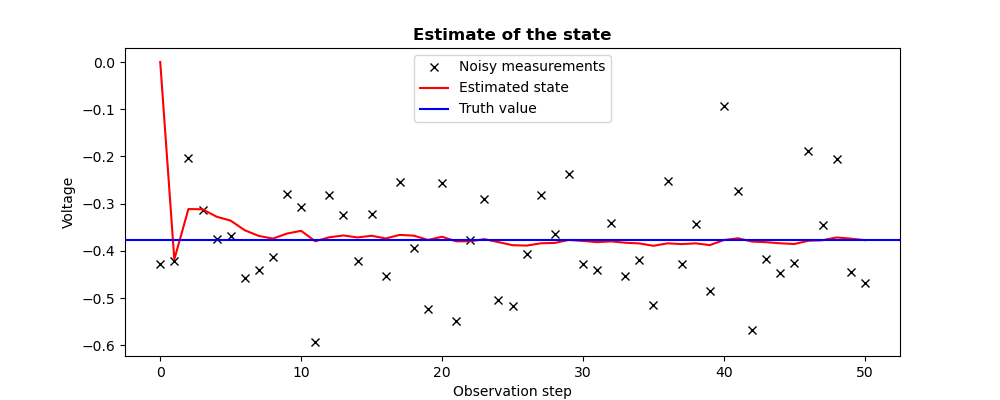
This example describes iterative estimation of a constant physical quantity (a
voltage) following seminal example of [Welch06] (pages 11 and following, also
available in the SciPy Cookbook). This model allows to illustrate the excellent
behavior of this algorithm with respect to the measurement noise when the
evolution model is simple. The physical problem is the estimation of the
voltage, observed on 50 time steps, with noise, which imply 50 analysis steps
by the filter. The idealized state (said the “true” value, unknown in a real
case) is specified as Xtrue in the example. The observations
(denoted by Yobs in the example) are to be set, using
the keyword “VectorSerie”, as a measure time series. We choose to emphasize
the observations versus the background, by setting a great value for the
background error variance with respect to the observation error variance. The
first observation is not used because the background is
used as the first state estimate.
The adjustment is carried out by displaying intermediate results during
iterative filtering. Using these intermediate results, one can also obtain
figures that illustrate the state estimation and the associated a posteriori
covariance estimation.
# -*- coding: utf-8 -*-#fromnumpyimportarray,randomrandom.seed(1234567)Xtrue=-0.37727Yobs=[]foriinrange(51):Yobs.append([random.normal(Xtrue,0.1,size=(1,)),])#print("Estimation by filtering of a time trajectory")print("--------------------------------------------")print(" Noisy measurements acquired on %i time steps"%(len(Yobs)-1,))print("")fromadaoimportadaoBuildercase=adaoBuilder.New()#case.setBackground(Vector=[0.])case.setBackgroundError(ScalarSparseMatrix=1.)#case.setObservationOperator(Matrix=[1.])case.setObservation(VectorSerie=Yobs)case.setObservationError(ScalarSparseMatrix=0.1**2)#case.setEvolutionModel(Matrix=[1.])case.setEvolutionError(ScalarSparseMatrix=1e-5)#case.setAlgorithmParameters(Algorithm="KalmanFilter",Parameters={"StoreSupplementaryCalculations":["Analysis","APosterioriCovariance",],},)case.setObserver(Info=" Analyzed state at current observation:",Template="ValuePrinter",Variable="Analysis",)#case.execute()Xa=case.get("Analysis")Pa=case.get("APosterioriCovariance")#print("")print(" Final a posteriori variance:",Pa[-1])print("")##-------------------------------------------------------------------------------#Observations=array([yo[0]foryoinYobs])Estimates=array([xa[0]forxaincase.get("Analysis")])Variances=array([pa[0,0]forpaincase.get("APosterioriCovariance")])#importmatplotlib.pyplotaspltplt.rcParams["figure.figsize"]=(10,4)#plt.figure()plt.plot(Observations,"kx",label="Noisy measurements")plt.plot(Estimates,"r-",label="Estimated state")plt.axhline(Xtrue,color="b",label="Truth value")plt.legend()plt.title("Estimate of the state",fontweight="bold")plt.xlabel("Observation step")plt.ylabel("Voltage")plt.savefig("simple_KalmanFilter1_state.png")#plt.figure()iobs=range(1,len(Observations))plt.plot(iobs,Variances[iobs],label="A posteriori error variance")plt.title("Estimate of the a posteriori error variance",fontweight="bold")plt.xlabel("Observation step")plt.ylabel("$(Voltage)^2$")plt.setp(plt.gca(),"ylim",[0,.01])plt.savefig("simple_KalmanFilter1_variance.png")
The execution result is the following:
Estimation by filtering of a time trajectory
--------------------------------------------
  Noisy measurements acquired on 50 time steps

  Analyzed state at current observation: [0.]
  Analyzed state at current observation: [-0.41804504]
  Analyzed state at current observation: [-0.3114053]
  Analyzed state at current observation: [-0.31191336]
  Analyzed state at current observation: [-0.32761493]
  Analyzed state at current observation: [-0.33597167]
  Analyzed state at current observation: [-0.35629573]
  Analyzed state at current observation: [-0.36840289]
  Analyzed state at current observation: [-0.37392713]
  Analyzed state at current observation: [-0.36331937]
  Analyzed state at current observation: [-0.35750362]
  Analyzed state at current observation: [-0.37963052]
  Analyzed state at current observation: [-0.37117993]
  Analyzed state at current observation: [-0.36732985]
  Analyzed state at current observation: [-0.37148382]
  Analyzed state at current observation: [-0.36798059]
  Analyzed state at current observation: [-0.37371077]
  Analyzed state at current observation: [-0.3661228]
  Analyzed state at current observation: [-0.36777529]
  Analyzed state at current observation: [-0.37681677]
  Analyzed state at current observation: [-0.37007654]
  Analyzed state at current observation: [-0.37974517]
  Analyzed state at current observation: [-0.37964703]
  Analyzed state at current observation: [-0.37514278]
  Analyzed state at current observation: [-0.38143128]
  Analyzed state at current observation: [-0.38790654]
  Analyzed state at current observation: [-0.38880008]
  Analyzed state at current observation: [-0.38393577]
  Analyzed state at current observation: [-0.3831028]
  Analyzed state at current observation: [-0.37680097]
  Analyzed state at current observation: [-0.37891813]
  Analyzed state at current observation: [-0.38147782]
  Analyzed state at current observation: [-0.37981569]
  Analyzed state at current observation: [-0.38274266]
  Analyzed state at current observation: [-0.38418507]
  Analyzed state at current observation: [-0.38923054]
  Analyzed state at current observation: [-0.38400006]
  Analyzed state at current observation: [-0.38562502]
  Analyzed state at current observation: [-0.3840503]
  Analyzed state at current observation: [-0.38775222]
  Analyzed state at current observation: [-0.37700787]
  Analyzed state at current observation: [-0.37328191]
  Analyzed state at current observation: [-0.38024181]
  Analyzed state at current observation: [-0.3815806]
  Analyzed state at current observation: [-0.38392063]
  Analyzed state at current observation: [-0.38539266]
  Analyzed state at current observation: [-0.37856929]
  Analyzed state at current observation: [-0.37744505]
  Analyzed state at current observation: [-0.37154554]
  Analyzed state at current observation: [-0.37405773]
  Analyzed state at current observation: [-0.37725236]

  Final a posteriori variance: [[0.00033921]]
The figures illustrating the result of its execution are as follows:
The Kalman filter can also be used for a running analysis of the observations
of a given dynamic model. In this case, the analysis is conducted
iteratively, at the arrival of each observation.
The following example deals with the same simple dynamic system from the
reference [Welch06]. The essential difference consists in carrying out the
execution of a Kalman step at the arrival of each observation provided
iteratively. The keyword “nextStep”, included in the execution order, allows
to not store the background in duplicate of the previous analysis.
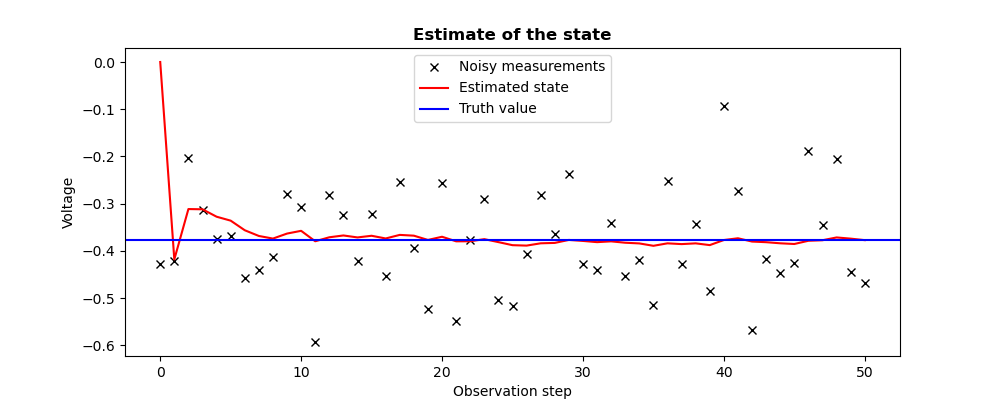
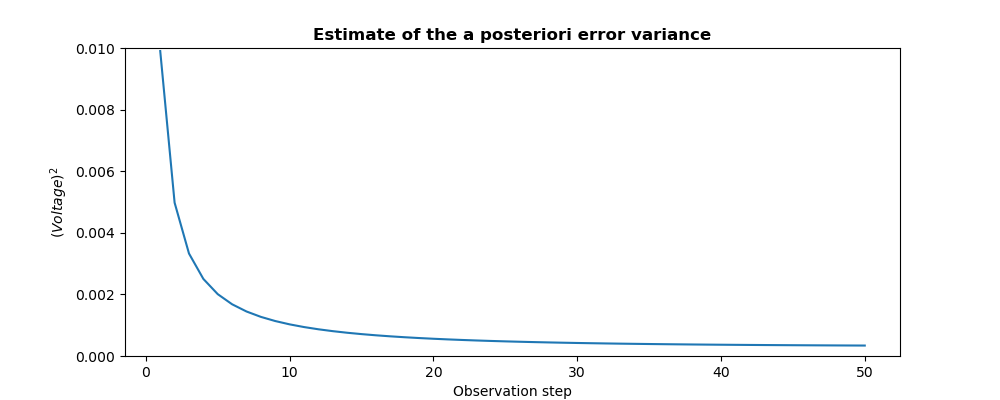
In an entirely similar way to the reanalysis (knowing that intermediate results
can be displayed, which are omitted here for simplicity), estimation gives the
same results during iterative filtering. Thanks to these intermediate
information, one can also obtain the graphs illustrating the estimation of the
state and the associated a posteriori error covariance.
# -*- coding: utf-8 -*-#fromnumpyimportarray,randomrandom.seed(1234567)Xtrue=-0.37727Yobs=[]foriinrange(51):Yobs.append([random.normal(Xtrue,0.1,size=(1,)),])#print("Estimation by filtering of a time trajectory")print("--------------------------------------------")print(" Noisy measurements acquired on %i time steps"%(len(Yobs)-1,))print("")fromadaoimportadaoBuildercase=adaoBuilder.New()#case.setBackground(Vector=[0.])case.setBackgroundError(ScalarSparseMatrix=1.)#case.setObservationOperator(Matrix=[1.])case.setObservationError(ScalarSparseMatrix=0.1**2)#case.setEvolutionModel(Matrix=[1.])case.setEvolutionError(ScalarSparseMatrix=1e-5)#case.setAlgorithmParameters(Algorithm="KalmanFilter",Parameters={"StoreSupplementaryCalculations":["Analysis","APosterioriCovariance",],},)## Loop to obtain an analysis at each observation arrival#foriinrange(1,len(Yobs)):case.setObservation(Vector=Yobs[i])case.execute(nextStep=True)#Xa=case.get("Analysis")Pa=case.get("APosterioriCovariance")#print(" Analyzed state at final observation:",Xa[-1])print("")print(" Final a posteriori variance:",Pa[-1])print("")##-------------------------------------------------------------------------------#Observations=array([yo[0]foryoinYobs])Estimates=array([xa[0]forxaincase.get("Analysis")])Variances=array([pa[0,0]forpaincase.get("APosterioriCovariance")])#importmatplotlib.pyplotaspltplt.rcParams["figure.figsize"]=(10,4)#plt.figure()plt.plot(Observations,"kx",label="Noisy measurements")plt.plot(Estimates,"r-",label="Estimated state")plt.axhline(Xtrue,color="b",label="Truth value")plt.legend()plt.title("Estimate of the state",fontweight="bold")plt.xlabel("Observation step")plt.ylabel("Voltage")plt.savefig("simple_KalmanFilter2_state.png")#plt.figure()iobs=range(1,len(Observations))plt.plot(iobs,Variances[iobs],label="A posteriori error variance")plt.title("Estimate of the a posteriori error variance",fontweight="bold")plt.xlabel("Observation step")plt.ylabel("$(Voltage)^2$")plt.setp(plt.gca(),"ylim",[0,.01])plt.savefig("simple_KalmanFilter2_variance.png")
The execution result is the following:
Estimation by filtering of a time trajectory
--------------------------------------------
  Noisy measurements acquired on 50 time steps

  Analyzed state at final observation: [-0.37725236]

  Final a posteriori variance: [[0.00033921]]
The figures illustrating the result of its execution are as follows:

 . Its value is defined as a
“Vector” or “VectorSerie” type object. Its availability in output is
conditioned by the boolean “Stored” associated with input.
. Its value is defined as a
“Vector” or “VectorSerie” type object. Its availability in output is
conditioned by the boolean “Stored” associated with input. . Its value is defined as a “Matrix” type
object, a “ScalarSparseMatrix” type object, or a “DiagonalSparseMatrix”
type object, as described in detail in the section
Requirements to describe covariance matrices. Its availability in output is
conditioned by the boolean “Stored” associated with input.
. Its value is defined as a “Matrix” type
object, a “ScalarSparseMatrix” type object, or a “DiagonalSparseMatrix”
type object, as described in detail in the section
Requirements to describe covariance matrices. Its availability in output is
conditioned by the boolean “Stored” associated with input. . It is defined as a “Matrix” type
object, a “ScalarSparseMatrix” type object, or a “DiagonalSparseMatrix”
type object, as described in detail in the section
Requirements to describe covariance matrices. Its availability in output is
conditioned by the boolean “Stored” associated with input.
. It is defined as a “Matrix” type
object, a “ScalarSparseMatrix” type object, or a “DiagonalSparseMatrix”
type object, as described in detail in the section
Requirements to describe covariance matrices. Its availability in output is
conditioned by the boolean “Stored” associated with input. , which describes an elementary step of evolution. Its value
is defined as a “Function” type object or a “Matrix” type one. In the
case of “Function” type, different functional forms can be used, as
described in the section Requirements for functions describing an operator. If there
is some control
, which describes an elementary step of evolution. Its value
is defined as a “Function” type object or a “Matrix” type one. In the
case of “Function” type, different functional forms can be used, as
described in the section Requirements for functions describing an operator. If there
is some control  included in the evolution model, the operator has
to be applied to a pair
included in the evolution model, the operator has
to be applied to a pair  .
. .
Its value is defined as an object of type “Vector” if it is a single
observation (temporal or not) or “VectorSeries” if it is a succession of
observations. Its availability in output is conditioned by the boolean
“Stored” associated in input.
.
Its value is defined as an object of type “Vector” if it is a single
observation (temporal or not) or “VectorSeries” if it is a succession of
observations. Its availability in output is conditioned by the boolean
“Stored” associated in input. . It is defined as a “Matrix” type
object, a “ScalarSparseMatrix” type object, or a “DiagonalSparseMatrix”
type object, as described in detail in the section
Requirements to describe covariance matrices. Its availability in output is
conditioned by the boolean “Stored” associated with input.
. It is defined as a “Matrix” type
object, a “ScalarSparseMatrix” type object, or a “DiagonalSparseMatrix”
type object, as described in detail in the section
Requirements to describe covariance matrices. Its availability in output is
conditioned by the boolean “Stored” associated with input. , which transforms the input parameters
  to
results
to
results  to be compared to observations
 in optimization, an interpolate or an analysis
 in data assimilation.
 covariance
matrix. In order to get them, this a posteriori error covariances
supplementary calculation has to be requested at the same time by the keyword
“APosterioriCovariance”.
covariance
matrix. In order to get them, this a posteriori error covariances
supplementary calculation has to be requested at the same time by the keyword
“APosterioriCovariance”. .
. ,
that is of the background difference part. If this part does not exist in the
error function, its value is zero.
,
that is of the background difference part. If this part does not exist in the
error function, its value is zero. ,
that is of the observation difference part.
,
that is of the observation difference part.