Offset
Offset operation offsets sketch entities on a given distance. Offset is performed outside a closed contour or to the right of an open one, unless the Reversed flag is not set.
Edges junctions are filled in accordance with selected offset mode. The following modes are implemented:
Keep distance mode, enabled by default. It keeps the distance from initial contour to the resulting one, creating additional arcs where it is needed.
Arcs mode, where on connection of straight segments, tangent arcs are created. Only connection of straight lines is supported; with other types of curves, offset will work as in Keep distance mode. Radius of arcs equals to the offset value. These arcs cut off the initially connected lines, so, if in result at least one such line becomes invalid (removed from the result), the arc is not created in this connection, the line is created in this point as in the Lines mode.
Lines mode, where no arcs is created on the connection of the resulting lines. Adjacent lines are prolonged to the point of their intersection. If the offset arguments are not straigh lines (arcs, bspline, etc), the offset will work as in the Keep distance mode in these locations.
To create an Offset in the active Sketch:
select in the Main Menu Sketch - > Offset item or
click
 Offset button in Sketch toolbar:
Property panel:
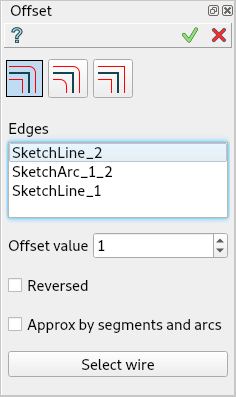
Offset
Input fields:
Offset mode can be Keep distance, Arcs or Lines
Approx by segments and arcs converts the input geometry of the offset algorithm to segments and arcs.
Edges is the list of segments (lines, circles, arcs) selected in the view.
Offset value is the offset distance.
Reversed sets the reversed offset side (inside a closed contour or to the left of an open one).
Button:
- Select wire button adds edges connected by coincident boundary constraint
and composing a wire with the already selected segments. Not more than 2 edges can be connected with one coincident point.
TUI Command:
- Sketch_1.addOffset(Objects, Distance, isReversed, Mode)
- Parameters:
list – A list of objects.
real – An offset distance.
boolean – Reversed flag.
string – Offset mode. Can be “KeepDistance”, “Arcs” or “Lines”.
- Returns:
Result object.
Result
Created Offset appears in the view.

Offset created
See Also a sample TUI Script of Create Offset operation.