Angular copy
Angular copy operation creates one or multiple copies of the sketch entities by rotation relative to a specified center point.
To create an Angular copy in the active Sketch:
select in the Main Menu Sketch - > Angular copy item or
click
 Angular copy button in Sketch toolbar:
Property panel:
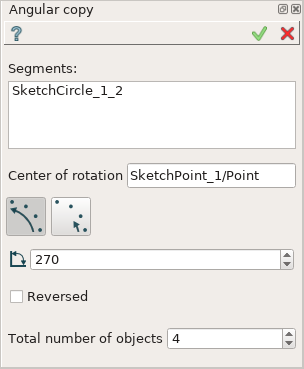
Angular copy
Input fields:
Segments is the list of segments (lines, circles, arcs) selected in the view;
Center of rotation is the center point selected in the view;
- Full angle/Single angle option:
 Full angle: angle step of rotation is equal to the defined angle divided by the number of copies (total number minus one).
 Single angle: angle step of rotation is equal to the defined angle.
Angle is the angle of rotation.
Reversed defines rotation direction. If checked - in a clockwise direction, otherwise - in a counterclockwise direction.
Total number of objects is the total number of objects including the original one.
TUI Command:
- Sketch_1.addRotation(Objects, CenterPoint, Angle, NumberOfObjects, FullValue, Reversed)
- Parameters:
list – A list of objects.
object – Center point.
real – Angle.
integer – Number of objects.
boolean – Full value flag.
boolean – Reversed flag.
- Returns:
Result object.
Result
Created Angular copy appears in the view.
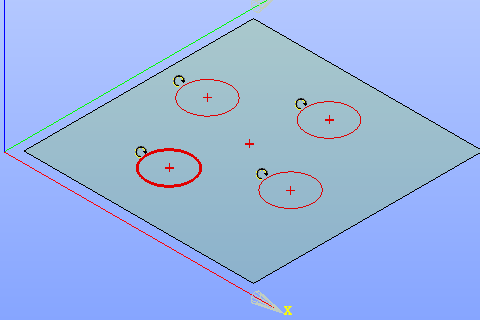
Created angular copy
See Also a sample TUI Script of Create Angular copy operation.