Chamfer
Chamfer feature creates chamfers on the edges or on the faces of a shape.
To create a Chamfer in the active part:
select in the Main Menu Feature - > Chamfer item or
click
 Chamfer button in the toolbar
There are 2 types of chamfer:

chamfer by two distances

chamfer by a distance and an angle
Chamfer by two distances
The property panel is shown below.
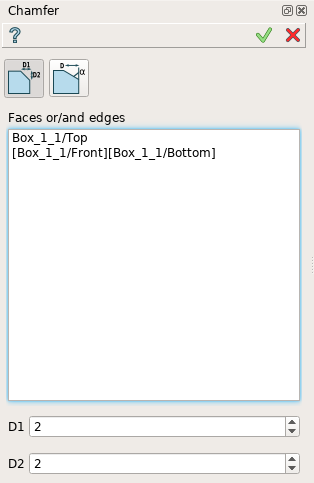
Chamfer by two distances property panel
Input fields:
Faces or/and edges panel contains chamfered faces and edges. All edges of a face are subject to chamfer operation. Faces and edges are selected in 3D OCC viewer;
D1 define the first chamfer distance;
D2 define the second chamfer distance;
TUI Command:
- model.addChamfer(Part_doc, [face, edge, ]perfomDistances, D1, D2)
- Parameters:
part – The current part object.
list – A list of faces and edges subject to fillet operation in format model.selection(TYPE, shape).
boolean – A “True” flag to indicate that the type of chamfer is by two distances.
number – D1 value.
number – D2 value.
- Returns:
Created object.
Result
Result of Chamfer by two distances is shown below.

Chamfer by two distances
See Also a sample TUI Script of Create Chamfer by distances operation.
Chamfer by a distance and an angle
Alternatively, there is a possibility to create a chamfer with a distance and an angle.
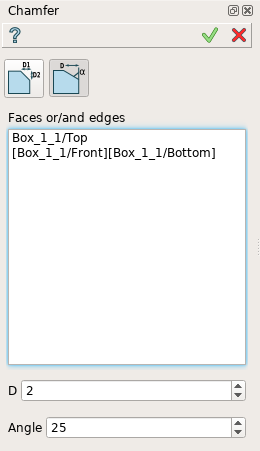
Chamfer by a distance and an angle
Input fields:
Faces or/and edges panel contains filleted faces and edges. All edges of a face are subject to fillet operation. Faces and edges are selected in 3D OCC viewer;
D defines the chamfer distance;
Angle defines the chamfer angle.
TUI Command:
- model.addChamfer(Part_doc, [face, edge, ]perfomDistances, D, Angle)
- Parameters:
part – The current part object.
list – A list of faces and edges subject to fillet operation in format model.selection(TYPE, shape).
boolean – A “False” flag to indicate that the type of chamfer is by a distance and an angle.
number – D value.
number – Angle value.
- Returns:
Created object.
Result
Result of Chamfer by a distance and an angle is shown below.
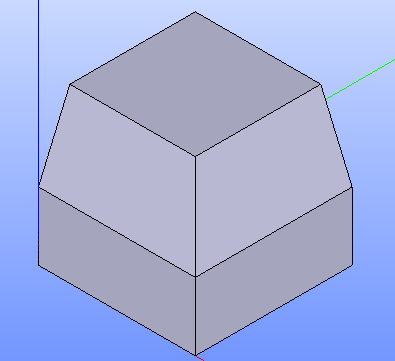
Chamfer by a distance and an angle
See Also a sample TUI Script of Create Chamfer by a distance and an angle operation.