Glue Faces
Glue Faces feature glues faces that are coincident with respect to the given tolerance value.
To perform Glue Faces in the active part:
select in the Main Menu Features - > Glue Faces item or
click
 Glue Faces button in the toolbar
The following property panel appears:
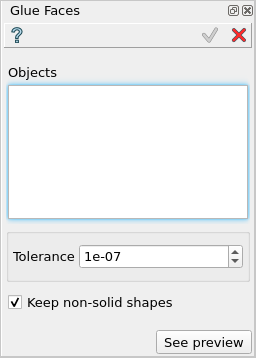
Glue Faces property panel
Input fields:
Objects - contains a list of objects selected in the Object Browser or in the Viewer, on which faces will be glued.
Tolerance - sets the tolerance value to be used for the gluing operation.
Keep non-solid shapes - defines whether to keep non-solid shapes during the gluing operation.
TUI Command:
- model.addGlueFaces(Part_doc, objects, tolerance, keepNonSolid)
- Parameters:
part – The current part object.
objects – A list of shapes for which faces should be glued.
number – The tolerance value.
boolean – True to keep non-solid shapes.
- Returns:
Created object.
Result
The result of the operation will be a compound shape with eliminated faces. If no faces were glued, the result will be a compound with the original selected shapes.
See Also a sample TUI Script of Glue Faces operation.