Revolution
Revolution feature revolves selected objects around selected axis.
To perform a Revolution in the active part:
select in the Main Menu Features - > Revolution item or
click
 Revolution button in the toolbar
The following property panel will be opened:

Start sketch
There are two variants of the property panel for Revolution depending on the chosen option:

By Angles revolves objects by specifying angles.

By Bounding Planes revolves objects by specifying bounding planes and angles.
By angles
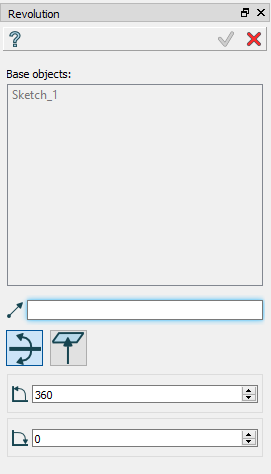
Revolution: definition by angles
Base objects - contains a list of objects selected in the Object Browser or in the Viewer, which will be revolved.
Axis - axis of revolution.
To angle - end angle of revolution.
From angle - start angle of revolution.
TUI Commands:
- model.addRevolution(part, objects, axis, angle)
- Parameters:
part – The current part object.
list – A list of objects for revolution.
object – An axis.
real – An angle.
- Returns:
Created object.
- model.addRevolution(part, objects, axis, toSize, fromSize)
- Parameters:
part – The current part object.
list – A list of objects for revolution.
object – An axis.
real – To angle.
real – From angle.
- Returns:
Created object.
Result
The Result of the operation will be a revolved shape:
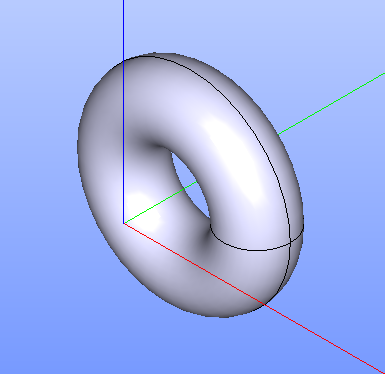
Revolution created
See Also a sample TUI Script of Create Revolution by angles operation.
By bounding planes
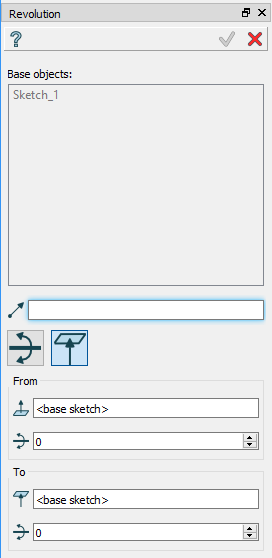
Revolution: definition by bounding planes
Base objects - contains a list of objects selected in the Object Browser or in the Viewer, which will be revolved.
Axis - axis of revolution.
To plane - a planar face can be selected to bound revolution from one side.
To offset - offset for revolution or for bounding plane, if selected.
From plane - a planar face can be selected to bound revolution from other side.
From offset - offset for revolution or for bounding plane, if selected.
TUI Command:
- model.addRevolution(part, objects, axis, toObject, toOffset, fromObject, fromOffset)
- Parameters:
part – The current part object.
list – A list of objects for revolution.
object – An axis.
object – To object.
real – To offset.
object – From object.
real – From offset.
- Returns:
Created object.
Result
The Result of the operation will be a revolved shape:
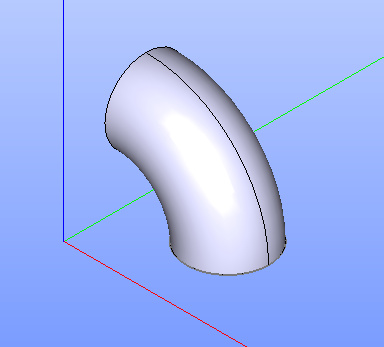
Revolution created
See Also a sample TUI Script of Create Revolution by bounding planes operation.