Extrusion
Extrusion feature extrudes selected objects along their normals or the selected axis.
To perform Extrusion in the active part:
select in the Main Menu Features - > Extrusion item or
click
 Extrusion button in the toolbar
The following property panel will be opened:

Start sketch
There are two variants of the property panel for Extrusion depending on the chosen option:

By Sizes extrudes objects by specifying sizes.

By Bounding Faces extrudes objects by specifying bounding faces/planes and offsets.
By sizes
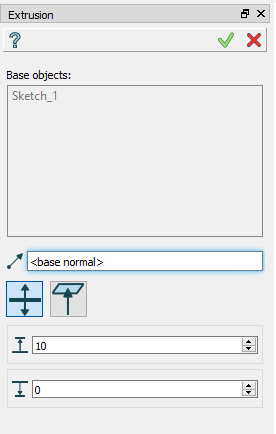
Extrusion: definition by sizes
Base objects - contains a list of objects selected in the Object Browser or in the Viewer, which will be extruded.
Axis - if selected, it will be the direction of extrusion, otherwise objects normals will be used.
To size - size for extrusion in the direction.
From size - size for extrusion in the opposite direction.
TUI Commands:
- model.addExtrusion(part, objects, size)
- Parameters:
part – The current part object.
list – A list of objects for extrusion.
number – Size of extrucion.
- Returns:
Created object.
- model.addExtrusion(part, objects, direction, size)
- Parameters:
part – The current part object.
list – A list of objects for extrusion.
object – A direction of extrusion
number – Size of extrucion.
- Returns:
Created object.
- model.addExtrusion(part, objects, toSize, fromSize)
- Parameters:
part – The current part object.
list – A list of objects for extrusion.
number – “Size to” value.
number – “Size from” value.
- Returns:
Created object.
- model.addExtrusion(part, objects, direction, toSize, fromSize)
- Parameters:
part – The current part object.
list – A list of objects for extrusion.
object – A direction of extrusion
number – “Size to” value.
number – “Size from” value.
- Returns:
Created object.
Result
The Result of the operation will be an extruded shape:
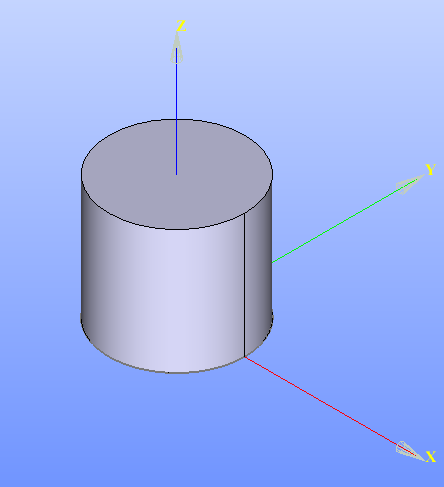
Created Extrusion
See Also a sample TUI Script of Create Extrusion by sizes operation.
By bounding faces
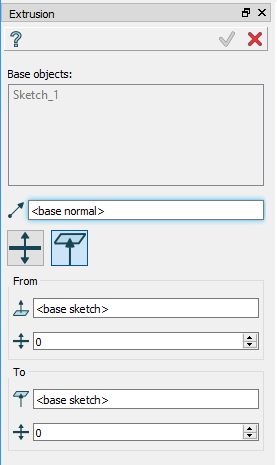
Extrusion: definition by bounding faces
Base objects - contains a list of objects selected in the Object Browser or in the Viewer, which will be extruded.
Axis if selected, it will be direction of extrusion, otherwise objects normals will be used.
To face - a face can be selected to bound extrusion from one side.
To offset - offset for extrusion or for bounding plane, if selected.
From face - a face can be selected to bound extrusion from the other side.
From offset - offset for extrusion or for bounding plane, if selected.
Planar face selected as a boundary of extrusion will be enlarged infinitely. As a result, extrusion bounded only by planar faces will be completed always. On the other hand, if the boundary face is not planar, extrusion may fail, for example, in case of the base object cannot be projected to this face along given direction.
TUI Commands:
- model.addExtrusion(part, objects, toObject, toOffset, fromObject, fromOffset)
- Parameters:
part – The current part object.
list – A list of objects for extrusion.
object – “To object”
number – “To offset”.
object – “From object”
number – “From offset”.
- Returns:
Created object.
- model.addExtrusion(part, objects, direction, toObject, toOffset, fromObject, fromOffset)
- Parameters:
part – The current part object.
list – A list of objects for extrusion.
object – A direction of extrusion
object – “To object”
number – “To offset”.
object – “From object”
number – “From offset”.
- Returns:
Created object.
Result
The Result of the operation will be an extruded shape:
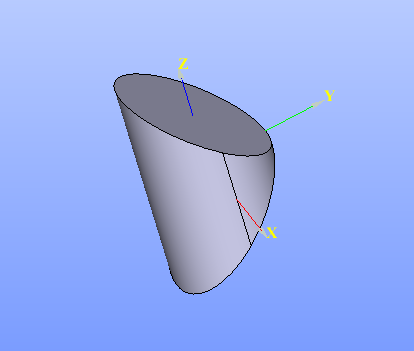
Created Extrusion
See Also a sample TUI Script of Create Extrusion by bounding planes operation.