Translation
Translation feature translates a selected shape.
To create a Translation in the active part:
select in the Main Menu Part - > Translation item or
click
 Translation button in the toolbar
The Vector of translation can be defined in three different ways:
by by axis and distance

by vector

by two points
Translation by axis and distance
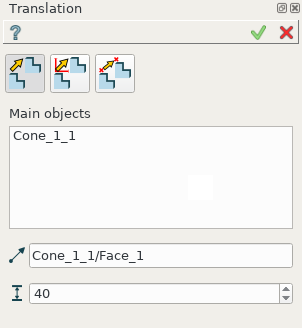
Translation by axis and distance property panel
Input fields:
Main objects panel contains shapes to be translated. The shapes are selected in 3D OCC viewer or object browser; Transformation of COMPSOLID subshapes is prohibited.
Axis defines a vector along which the object will be translated. The vector is an edge or axis selected in 3D OCC viewer or object browser;
Distance defines the distance along the Vector of translation.
TUI Command:
- model.addTranslation(Part_doc, [shape, ]axis, dist)
- Parameters:
part – The current part object.
list – A list of shapes in format model.selection(TYPE, shape).
object – axis in format model.selection(TYPE, shape).
real – Distance value.
- Returns:
Result object.
Result
The result of operation is a shifted initial shape.
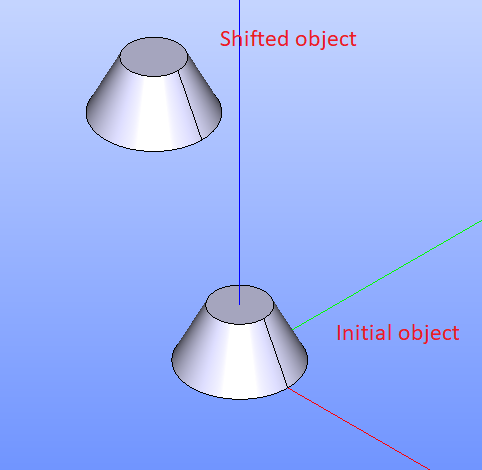
Translation by axis and distance
See Also a sample TUI Script of a Translation by axis and distance operation.
Translation by vector
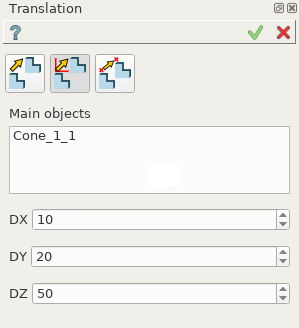
Translation by vector property panel
Input fields:
Main objects panel contains shapes to be translated. The shapes are selected in 3D OCC viewer or object browser; Transformation of COMPSOLID subshapes is prohibited.
DX, DY, DZ define vector using coordinates along the axis.
TUI Command:
- model.addTranslation(Part_1_doc, [shape, ]DX, DY, DZ)
- Parameters:
part – The current part object.
list – A list of shapes in format model.selection(TYPE, shape).
real – dX value.
real – dY value.
real – dZ value.
- Returns:
Result object.
Result
The result of operation is a shifted initial shape.
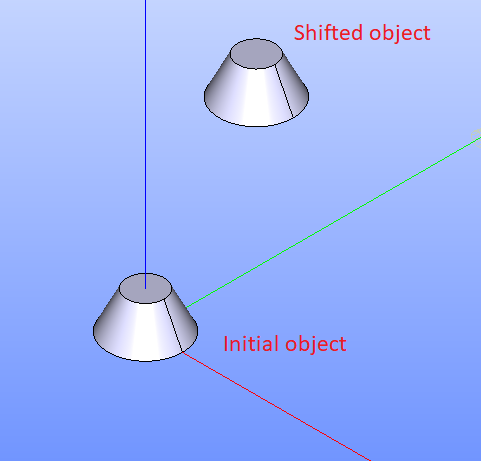
Translation by vector
See Also a sample TUI Script of Translation by vector operation.
Translation by two points
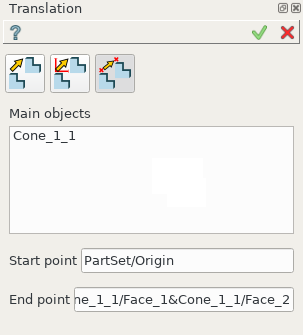
Translation by two points property panel
Input fields:
Main objects panel contains shapes to be translated. Shapes are selected in 3D OCC viewer or object browser; Transformation of COMPSOLID subshapes is prohibited.
Start point defines start vector point as point or vertex selected in 3D OCC viewer or object browser;
End point defines end vector point as point or vertex selected in 3D OCC viewer or object browser;
TUI Command:
- model.addTranslation(Part_doc, [shape, ]point1, point2)
- Parameters:
part – The current part object.
list – A list of shapes in format model.selection(TYPE, shape).
object – A point in format model.selection(TYPE, shape).
object – A point in format model.selection(TYPE, shape).
- Returns:
Result object.
Result
The result of operation is a shifted initial shape.
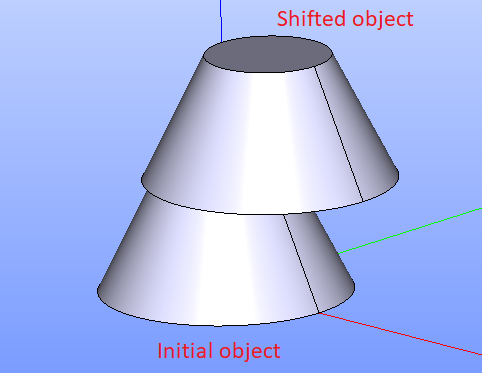
Translation by two points
See Also a sample TUI Script of Translation by 2 points operation.
Transformation of COMPSOLID subshapes is prohibited.
If you select one or more subshapes of COMPOUND as transformation (translation or other operation that changes the shape position or orientation) Main objects, all other subshapes will be also included in result at their original locations.
Transformation of COMPSOLID subshapes is prohibited, because we cannot guarantee the result still be a COMPSOLID after moving/duplicating some parts of it.