Offset
Offset feature translates each point of the Shape along a local normal by the given Offset distance (signed number, negative value means inner offset).
To create an Offset in the active part:
select in the Main Menu Features - > Offset item or
click
 Offset button in the toolbar
Two Offset algorithms are:
offset the whole shape by the same value

offset selected faces by the given value, other faces by zero.
Offset the whole shape by the same value
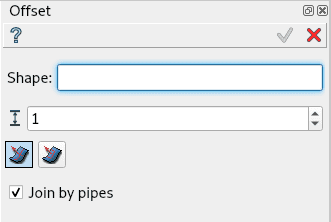
Offset by the same value property panel
Input fields:
Shape defines the base shape (solid, shell or face) selected in 3D OCC viewer or object browser;
Distance defines the offset value. Negative value meaning inner offset;
Join by pipes check box defines the mode of filling the gaps between translated adjacent surfaces:
if <b>Join by pipes</b> is activated, they are filled with pipes;
else the surfaces are extended and intersected, so that sharp edges are preserved;
TUI Command:
- model.addOffset(Part_doc, shape, dist, isPipeJoint)
- Parameters:
part – The current part object.
object – A shape in format model.selection(TYPE, shape).
real – Offset distance value.
boolean – Join by pipes/intersection flag.
- Returns:
Created object.
Result
Result of offset of a box. Join by pipes activated.
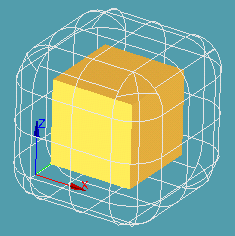
Offset of a box
See Also a sample TUI Script of offset operation.
Offset selected faces by the given value, other faces by zero
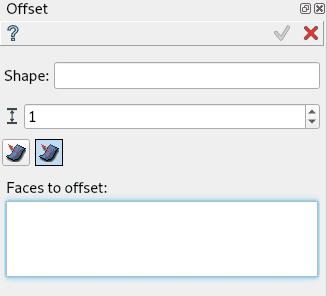
Partial Offset property panel
Input fields:
Shape defines the base shape (solid, shell or face) selected in 3D OCC viewer or object browser;
Distance defines the offset value. Negative value meaning inner offset;
Faces to offset defines the faces of the base shape, which should be offset;
Note: In Partial Offset mode gaps are always filled by intersection.
TUI Command:
- model.addOffsetPartial(Part_doc, shape, dist, faces)
- Parameters:
part – The current part object.
object – A shape in format model.selection(TYPE, shape).
real – Offset distance value.
objects – Faces of the shape in format [model.selection(TYPE, shape), …].
- Returns:
Created object.
Result
Result of partial offset of a box. Top and front faces selected.
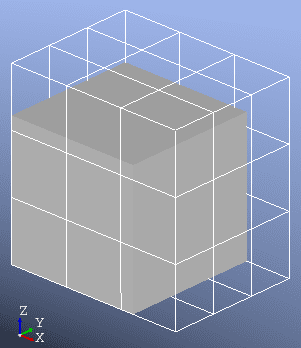
Partial offset of a box
See Also a sample TUI Script of offset operation.