Sewing
Sewing feature unites several faces (possibly contained in a shell, solid or compound) into one shell. Geometrically coincident (within a specified tolerance) edges (or parts of edges) of different faces are replaced by one edge thus producing a shell or faces with shared boundaries.
To perform the Sewing in the active part:
select in the Main Menu Features - > Sewing item or
click
 Sewing button in the toolbar
The following property panel will be opened:
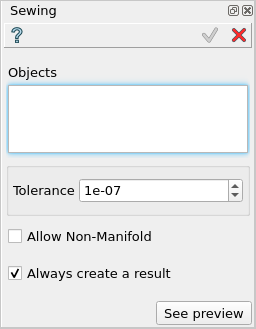
Sewing feature
Input fields:
Objects contains a list of objects selected in the Object Browser or in the Viewer, which will be sewn.
Tolerance defines the tolerance to use for the Sewing operation.
Allow Non-Manifold allows to create non-manifold shapes, if checked.
Always create a result allows to always create a result shape, even if there was nothing sewn.
TUI Command:
- model.addSewing(Part_doc, objects, tolerance, allowNonManifold, createResult)
- Parameters:
part – The current part object.
list – A list of objects.
real – The tolerance value to be used for the sewing.
boolean – Defines whether to allow non-manifold results.
boolean – Defines whether to always create a result.
- Returns:
Created object.
Result
The Result of the operation will be a shape with all coincident edges being united:
See Also a sample TUI Script of Create Sewing operation.