Fuse Faces
Fuse Faces feature eliminates the edges between adjacent same-domain faces lying on the same geometrical surface. This feature is useful for processing the results of Fuse, Union or Partition operations.
To perform Fuse Faces in the active part:
select in the Main Menu Features - > Fuse Faces item or
click
 Fuse Faces button in the toolbar
The following property panel appears:
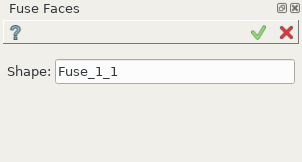
Fuse Faces property panel
Input fields:
Shape - contains object selected in the Object Browser or in the Viewer, on which faces will be fused.
TUI Command:
- model.addFusionFaces(Part_doc, shape)
- Parameters:
part – The current part object.
list – A shape in format model.selection(TYPE, shape).
- Returns:
Created object.
Result
The Result of the operation will be a shape with eliminated edges:

Shape before and after operation Fuse Faces
See Also a sample TUI Script of Fuse Faces operation.